
Lucid Imaging OptiCheck® PDF Proofing System
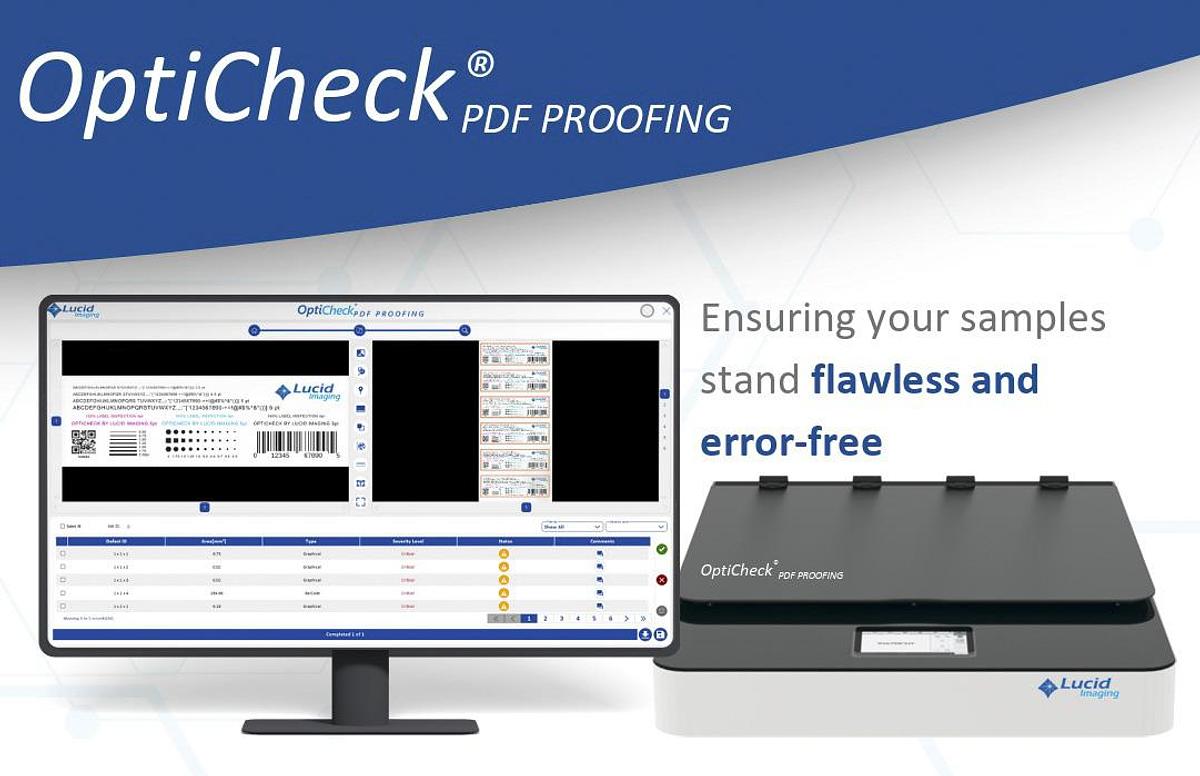
Lucid Imaging OptiCheck® PDF Proofing System
Contact us for price
Description
OptiCheck® PDF PROOFER is a state-of-the-art system using the latest in image processing technology for detecting the variation in the printed job against the master PDF. This innovative tool ensures that the samples produced are error-free, providing printing professionals with a reliable means to maintain the highest standards of quality and accuracy in their output.
The technology used in the proposed PDF Proofing solution is based on advanced image processing, high-resolution and sophisticated image comparison algorithms. The OptiCheck® PDF PROOFING solution uses advanced algorithms to identify differences between reference PDF and scanned document, including content, text, graphics, images, color elements and other print-critical features. The system is designed to provide accurate and repeatable verification while minimizing false detections. The software architecture is designed to efficiently utilize modern multi-core and multi-processor computing platforms, enabling high-resolution documents to be processed and compared efficiently. The application provides an interactive user environment for configuring inspection parameters, reviewing detected differences, and generating detailed inspection results. The solution is designed to support different PDF proofing applications, including PDF-to-PDF prepress verification and PDF-to-Print production verification, Print to Print Comparison for sampling verification during production, providing a flexible platform for quality control throughout the printing workflow.
The system is designed to verify the printed artwork with the master PDF to make sure the job printed is as per the master PDF and there is no mix up. A standalone system PDF to Print Verification System includes Lucid Imaging’s Flatbed Scanner connected to the PDF Proofing System. The operator initially has to load the master PDF and create a JOB for inspection. Here the operator defines different tolerance levels, area of inspection as per the artwork. Once the job is created, samples are scanned using scanner and each sample is compared with the master PDF to inspect for the deviation. Job result is published with the result of each sample for customer reference. User can review the defects and generate a report with all details.
Specifications of the system
General Details
1. Resolution- up to 600 DPI
2. Min defect size of 0.01mm sq
Defect Detection
1. Text Inspection
a. High precision inspection with all fronts and all languages
b. Missing parts/ character breakage
c. Character filling/smudges
d. Character mismatched (Text change, Missing or added Text)
2. Artwork Inspection
a. Printing defects in Artwork
b. Size or alignment variation in artwork
c. Missing or additional elements in artwork
3. Missing Ink, Ink Smudges, Mis Registration
4. High contrast scratches, streaks, spot
5. Relative Color Deviation between Sample and Master
6. 1D and 2D code inspection-
a. Automatic Identification, inspection and decoding of 1D and 2D codes
b. Relative grading of 1D and 2D codes
Software Features
1. Job Management -Easily manage, view, and edit multiple jobs
2. Color and Layer Management*
3. Multi Page PDF*
4. Automatic PDF Scaling*
5. Comparison modes: PDF to Scan, PDF to PDF, Scan to Scan
6. Automatic Die Line Extraction*
7. Multiple UP inspection
8. Registration control option
9. Profile Storage for different jobs
10. Defect Management- Easy UI for reviewing, evaluating and annotating
11. Reports- Report in PDF format showing defect image and comments
12. Text extraction and comparison*
13. User Access Management
a. Add/remove/edit user
b. User wise detail
c. Edit access privilege
d. Model editing restricted to super-user
e. Model in edit at one user cannot be accessed by another user
14. Audit Trail Log
a. Logging username and activity timestamp
b. Logging the actual changes in textural configuration while saving the model
c. Logging top-level changes in graphical configuration e.g., region, tie-point, die-line if added/removed/edited
d. Logging the ID of difference/error which is authorized
*Attached PDF provides information in detail regarding die line, layer etc. to carry out the functions.
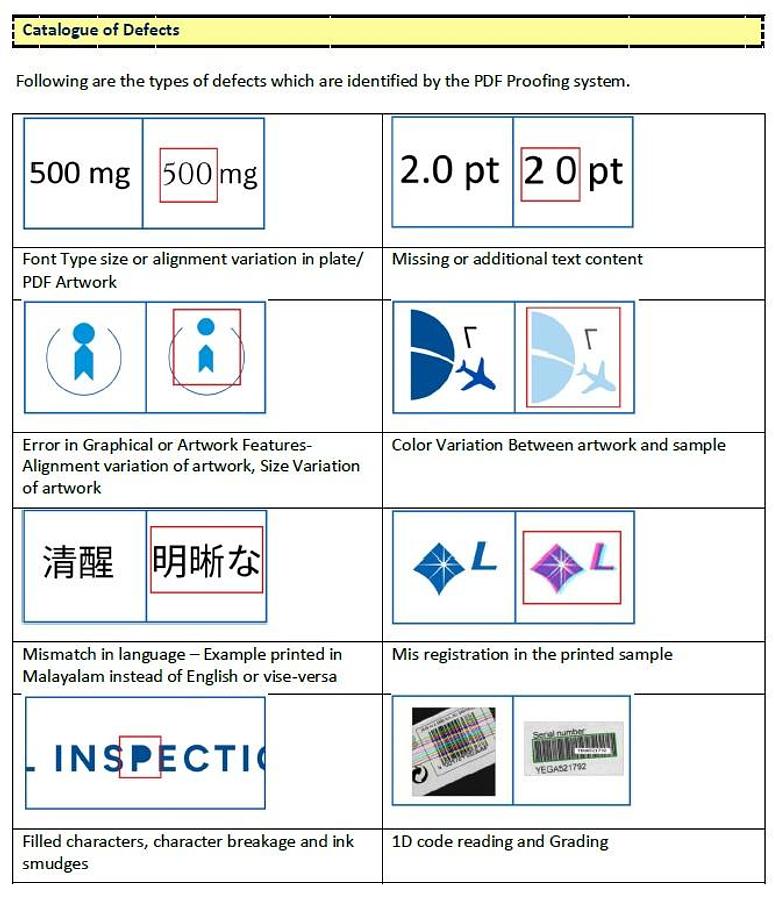
Catalogue of Defects
Images for the catalogue of defects identified by the PDF Proofing System as noted below:
1. Font Type or alignment variation in plate/PDF Artwork
2. Missing or additional text content
3. Error in Graphical or Artwork Features – Alignment variation of artwork, size variation of artwork
4. Color variation between artwork and sample
5. Mismatch in language – example printed in Spanish instead of English or vice-versa
6. Mis-registration in the printed sample
7. Filled characters, character breakage and ink smudges
8. 1D code reading and grading
At Capital Equipment Solutions, we pride ourselves on being your go-to partner for new and pre-owned printing and packaging equipment, as well as turnkey solutions, including delivery and installation. Our extensive inventory features high-quality, late-model equipment from industry-leading manufacturers such as Muller Martini, Bobst, Brausse, Heidelberg, Komori, KBA, MANRoland Goss, and more. In addition to our turnkey services, our expert operations team can assist with insurance restoration, removals, relocation, and plant liquidation. We’re dedicated to providing you with personalized guidance and comprehensive solutions that cater to your unique production requirements. Don’t forget to explore our full range of offerings on our website, and feel free to reach out to our expert team for any questions or assistance.
Specifications
| Manufacturer | Lucid Imaging |
| Model | OptiCheck |
| Condition | New |
| Stock Number | 5891580 |